![EP_Logo_White.svg]](https://help.eliteprospects.com/hubfs/EP_Logo_White.svg)
Watchlists are the central hub for tracking players on Elite Prospects. This feature replaces the previous Bookmarks and My Roster tools with a more flexible system for organizing your scouting.
You MUST be signed into an account (free, Plus, or Premium) to access Watchlists.
1. How to Watchlist a Player
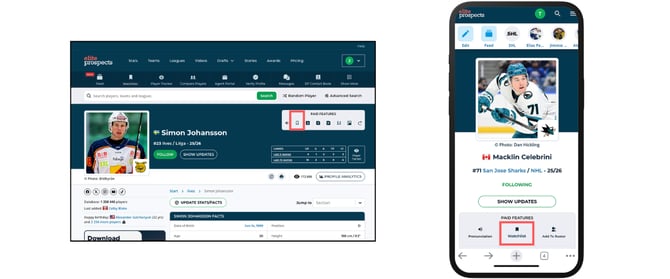
You can add players to your watchlists directly from any player profile.
- Search for a player and open their profile.
- Click the "Watchlist" button (located in Paid Features toolbar).
- Select the specific list(s) you want to add them to.
- A player can be saved to multiple Watchlists simultaneously.
2. How to Create a Watchlist
By default, every account starts with one Watchlist.
- Navigate to the Watchlists tab in the main menu.
- Click "Add list."
- Enter a name and save.
- Note: Creating more than one list requires a Plus or Premium subscription.
FAQ's
Where are my old Bookmarks and Rosters?
Everything has been automatically moved. Your old Bookmarks and My Roster data now live within your Watchlist dashboard.
Why can’t I create a second Watchlist?
The ability to segment your scouting into multiple, separate lists is a Plus and Premium feature. If you are on a free account, you will need to upgrade to unlock additional lists.
What is the player limit per list?
Each Watchlist can hold up to 500 players.