![EP_Logo_White.svg]](https://help.eliteprospects.com/hubfs/EP_Logo_White.svg)
At Elite Prospects, we prioritize "Safety by Design." To protect young athletes, we do not allow private, unobservable channels between adults and minors (users under 18). Because of this, the messaging process looks slightly different when an adult contacts a minor for the first time.
Here is the step-by-step process for how a conversation is established.
1. The Adult Sends a Message
When an adult user (coach, scout, etc.) sends a message to a minor, the conversation is immediately flagged for transparency.
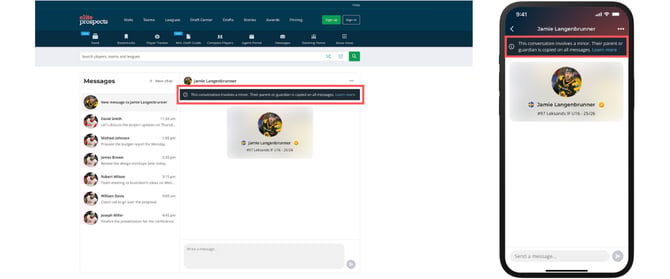
- The Banner: The adult will see a permanent banner at the top of the chat window stating:
"This conversation involves a minor. Their parent or guardian is copied on all messages." - Status: The message is sent, but it is not yet visible to the minor. It is held in a secure queue until parental verification is complete.
2. The Minor Receives an Invitation
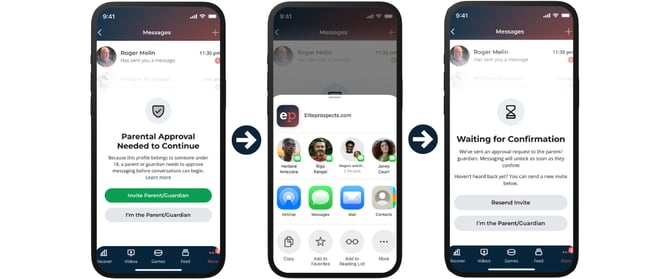
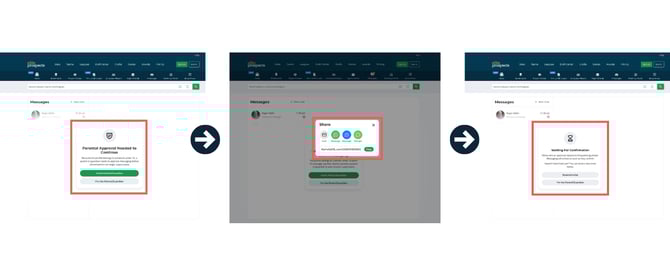
Instead of seeing the text of the message immediately, the minor receives a system notification prompting them to connect a parent or guardian to their account.
- The minor receives an invite link to forward to their parent/guardian.
- Note: The minor cannot unlock the message or reply until this step is completed.
3. The Parent/Guardian Verifies & Sets Preferences
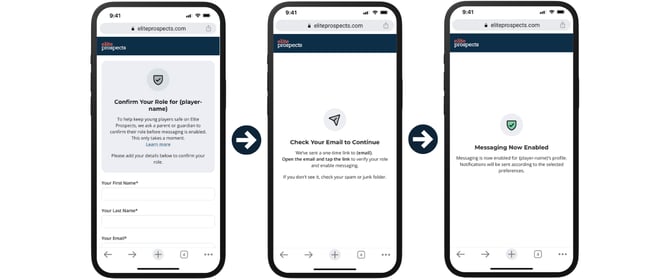
The parent receives the invitation link to connect to their child’s profile. To finalize the setup, the parent must:
- Verify their name/email.
- Select Notification Settings: The parent chooses how they want to oversee the chat (e.g., a daily email summary digest, or no notifications because they are already overseeing the account).
- Confirm email.
4. The Conversation is Unlocked
Once the parent has completed the setup:
- The original message from the Adult is released and becomes visible to the Minor.
- The Minor can now reply.
- The Parent/Guardian automatically receives copies/transcripts of the exchange based on the settings they chose.
Frequently Asked Questions
Why can't I see the message a coach sent me? If you are under 18, you cannot participate in 1-on-1 chats without a verified parent connected to your account. Please check your notifications and follow the prompt to invite your parent or guardian.
I am a coach. How do I know if the parent is connected? You can send your message as normal. If the parent is not yet connected, your message will remain "Pending" until the minor and their parent complete the setup process. You do not need to take any extra action.
Can a parent turn off the transcript notifications? Parents can adjust how they are notified (e.g., a daily email summary digest, or no notifications because they are already overseeing the account).
For an overview of our messaging safety policies, visit Youth Safety and Communication Standards.