![EP_Logo_White.svg]](https://help.eliteprospects.com/hubfs/EP_Logo_White.svg)
To maintain a safe environment for young athletes, Elite Prospects disables the messaging feature for all users under 18 by default. A minor cannot send or read messages until a verified parent or guardian is connected to their account.
Here is how the process works for players, parents, and the adults communicating with them.
1. Messaging is Initially Disabled for Minors
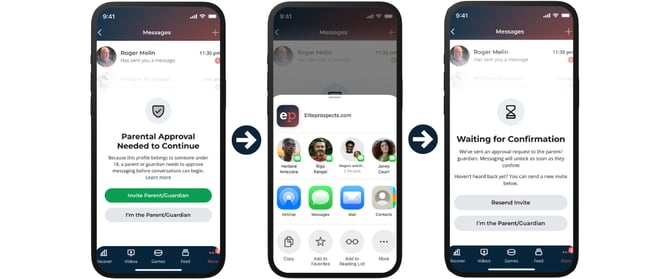
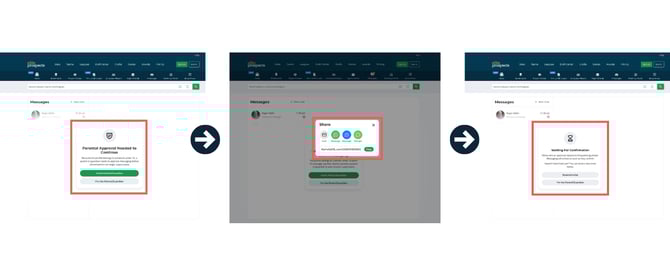
When a minor visits their inbox, they will see that the feature is locked. To unlock it, they must send an invite link to a parent or guardian’s directly from the messaging tab.
-
If an adult messages a minor first: The message is not delivered immediately. Instead, the minor receives a system notification letting them know an adult is trying to contact them, prompting them to invite a parent to unlock the chat.
2. The Parent/Guardian Verifies & Sets Preferences
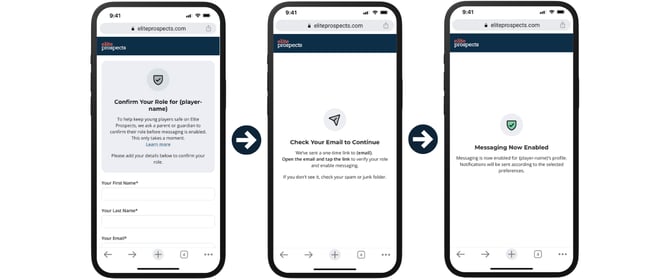
The parent receives the invitation link to connect to their child’s profile. To finalize the setup, the parent must:
- Verify their name/email.
- Select Notification Settings: The parent chooses how they want to oversee the chat (e.g., a daily email summary digest, or no notifications because they are already overseeing the account).
- Confirm email.
3. Messaging is Unlocked
Once the parent is connected, the messaging feature is instantly activated for the minor. They can now send and receive messages freely.
4. Safety Features Remain Active
Even after the feature is unlocked, our "Safety by Design" rules apply to every conversation to ensure transparency:
-
For the Parent: You will receive a daily email summary of all conversations your child has participated in. Unless you have chosen No Notifications because you are already overseeing the account.
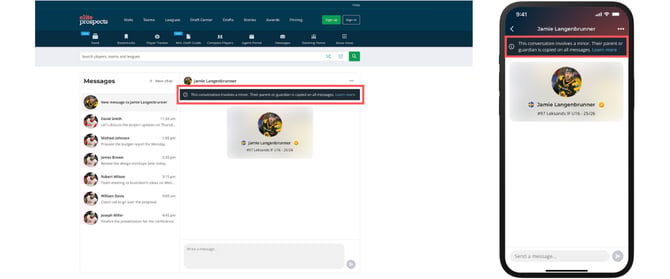
For the Adult: Every time an adult (coach, scout, etc.) opens a chat with a minor, they will see a prominent banner at the top of the screen:
"This conversation involves a minor. Their parent or guardian is copied on all messages."
Frequently Asked Questions
Can a minor turn off the parental notifications? No. A minor cannot disable the parental connection or stop the daily summaries from being sent. These safeguards remain active until the user turns 18.
What happens to messages sent before the parent connected? Any messages sent by adults while the account was "locked" are held in a queue. Once the parent verifies the account, those messages will appear in the minor's inbox.
For an overview of our messaging safety policies, visit Youth Safety and Communication Standards.