![EP_Logo_White.svg]](https://help.eliteprospects.com/hubfs/EP_Logo_White.svg)
Available from version 1.5.0, the Elite Prospects app introduces Livescore, giving you real-time goal, assist, and result updates for your favorite teams, leagues, and games.
Step 1: Confirm Notifications Are Enabled
-
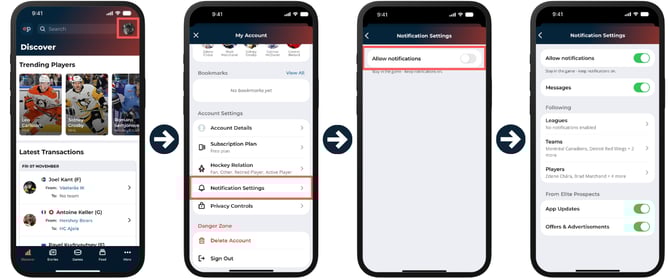
Tap your profile picture in the top-right corner.
-
Select Notification Settings.
-
Make sure Allow Notifications is toggled on.
Step 2: Manage Team Notifications
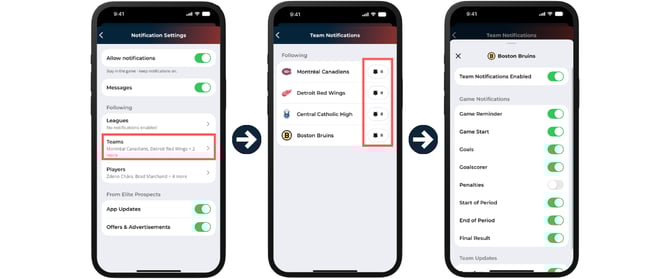
By default, Livescore notifications are enabled for all teams you follow, so you’ll automatically receive goal, assist, and result alerts.
To customize these settings:
-
Tap Teams.
-
Use the bell icon next to each team to turn notifications on or off, or to personalize what you want to be notified about.
Step 3: Manage League Notifications
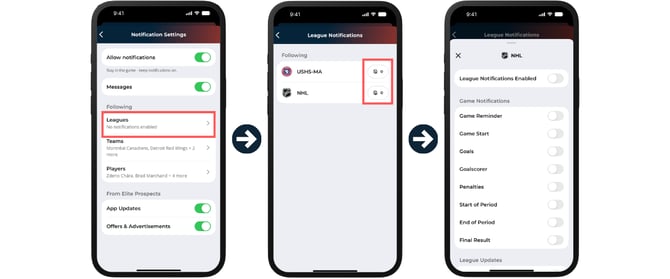
By default, no Livescore notifications are enabled for leagues.
You can turn them on by:
-
Tapping Leagues.
-
Selecting the bell icon next to the league name to enable updates.
Setting Livescore Notifications for Individual Games
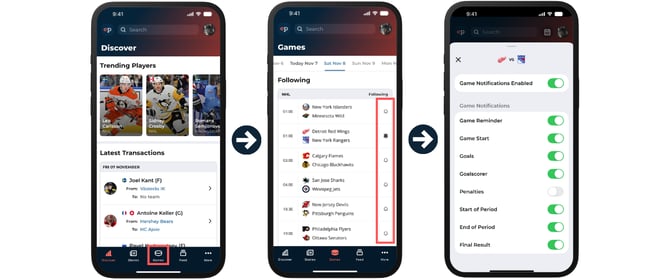
You can also receive Livescore updates for specific games, even if you don’t follow the teams involved.
-
Go to the Games tab.
-
Tap the bell icon next to the game you want to follow.
-
Press the bell once to enable all notifications for that game.
-
Press it again to open advanced options and customize your notification preferences.
Stay in the Game
Make sure you’ve updated to version 1.5.0 or later to access Livescore and all related notification settings.